
• Product

    Product

    Sales CRM

    Close deals faster with AI

    Marketing CRM

    Automate campaigns across channels

    Service CRM

    Resolve customer issues faster

    Automation CRM

    Automate workflows without code

    • AI SDR Agent
    • Contact 360° View
    • Lead & Deal Segmentation
    • Smart Deal Pipeline
    • Sales Playbook Automation
    • Auto Follow-Up Sequences
    • Meeting Scheduler with CRM Sync
    • Missed Call Automation
    • Click-to-Call Anywhere
    • Smart List Builder
    • Multi-Channel Campaign Builder
    • A/B Testing & AI Optimizations
    • Dynamic Form Builder with Chat Integration
    • Behavioral Trigger Campaigns
    • Contact Lifecycle Tracking
    • AI-Powered Support(Voice + Chat)
    • Helpdesk Ticketing + Live Chat Integration
    • Auto FAQ & KB Integration in Chatbot
    • Voice Call Routing & Agent Assignment
    • Multi-Channel Feedback Collection
    • Voice/Chat Summary Saved to Record Automatically
    • No-Code Workflow Builder
    • Smart Triggers
    • Event-Based Triggers
    • AI Intent-Based Triggers
    • AI-Based Branching Logic
    • Custom Field Capture in Conversations
    • Cross-Platform Automation
    • Webhook Support + API Access

    Integrations

    Stripe

    Zoho

    Make

    HubSpot

    Zapier

    bigin

    Bigin

    Pabbly

    slack

    Slack

    and 6000 + integrations

  • Channel

    Bulk SMS Campaigns

    Send mass messages instantly

    Automated SMS Replies

    Set keyword-based auto responses

    SMS Opt-Out Handling

    Automatically exclude unsubscribed numbers

    Drip SMS Sequences

    Time-based SMS journeys

    10DLC Support

    Ensure deliverability & compliance with US 10DLC standards.

    Toll Free Texting

    Use toll-free numbers for campaigns & 2-way conversations.

    Two-Way SMS Messaging

    Engage in real-time text conversations with customers.

    Email to SMS

    Send SMS directly from your email inbox (no plugins needed).

    See more features

    Rich Media Messaging

    Send images, videos, carousels, and buttons natively in the inbox

    Verified Sender Branding

    Appear with business name, logo, and trust badge

    Suggested Replies & Action

    Guide users with quick response buttons and call-to-actions

    Interactive Product Showcases

    Display products or services with tap-to-buy options

    Fallback to SMS

    Automatically switch to SMS if RCS isn’t supported

    Customer Segmentation

    Send targeted RCS messages based on tags, behavior, or location

    Integrated Analytics

    Track click-throughs, replies, and conversion metrics

    2-Way Conversations

    Enable interactive chats with real-time CRM syncing

    See more features

    Broadcast Campaigns

    Send bulk messages using approved templates

    WhatsApp Flow Builder

    Design interactive WhatsApp journeys

    Click-to-chat

    Send Mass Text Message quickly and easily

    Opt-out & Consent Management

    Automatically handle opt-outs and privacy

    Drip Sequences

    Create automated WhatsApp flows based on time delays, actions, or funnel stages.

    Verified Green Tick Support

    Get help in registering and managing your official WhatsApp Business API account.

    Category-Based Campaigns

    Run separate campaigns for demo users, trials, high-intent leads, or renewals — with dynamic tags.

    Smart Contact Segmentation

    Target users based on behavior, tags, or CRM filters for higher engagement.

    See more features

    Inbound Contact Center

    Manage and route customer support calls efficiently

    Sales Dialer

    Boost outreach with automated outbound dialing

    Power Dialer

    Automatically dial multiple leads back-to-back to triple your team's outreach efficiency.

    Outbound Call Center

    Call campaigns for follow-ups, reminders, and sales

    IVR (Call Menu)

    Let customers navigate and self-serve with smart menus

    Call Recording

    Record all calls for training, compliance, and quality

    Call Forwarding

    Redirect calls to the right team or agent instantly

    Automated Voice Campaigns

    Run personalized, AI-driven calls at scale to engage, qualify, and convert leads hands-free.

    See more features

    Drag and Drop Builder

    create emails from drag-and-drop builder

    Drip Sequences

    Automate follow-ups with time-based email flows

    Open & Click Tracking

    Know who’s engaging and when

    Smart Segmentation

    Target by tags, actions, or CRM properties

    Email Templates

    Save reusable layouts for common use cases

    Smart Trigger Emails

    Auto-send based on pipeline stage or tags

    Compliance Built-In

    Easy opt-out, consent tracking, and domain control

    Deliverability Insights

    Monitor bounce rate, spam score & performance

    See more features

    Tools

    • Phone Verifer
    • Email Verifier
    • Template Generator
    • Lead Finder
    • WhatsApp Chat Button

    Find Our Apps on

  • AI

    Agents

    • WhatsApp Agent
    • SMS Agent
    • Voice Agent
    • Email Agent
    • Sales Agent
    • Support Agent

    Use Cases

    Lead Qualification Bot

    Auto-qualify leads with contextual questions and update CRM instantly

    Appointment Booking Bot

    Send Mass Text Message quickly and easily

    Customer Support Bot

    Answer FAQs, check order status, and escalate complex issues

    Feedback Collection Bot

    Run CSAT/NPS surveys across WhatsApp, SMS, or voice

    Intent-Based Routing Bot

    Understand user query and route to the right agent or workflow

    Voice Call Back Bot

    Capture missed calls and auto-offer callback or support

    Multi-Step Booking Bot

    Book appointments with time slot, confirmation, and reminder.

    Knowledge Base Navigator

    Understand the query and guide users to the right article step-by-step.

    See more usecases

    Features

    • Conversational AI (Voice + Chat)
    • Multilingual & Accent Adaptive
    • Context Retention Across Channels
    • Custom Objectives (Sales, Support)
    • Call Flow Automation
    • Human Handoff with Smart Routing
  • Solutions

    By Team

    • Sales
    • Marketing
    • Service
    • Operations

    By Company Size

    • StartUp
    • Small Business
    • Mid-Market
    • EnterPrise

    By Industry

    • Healthcare
    • Property & RealEstate
    • SaaS & Tech
    • Recruiting
    • EdTech
    • Finances


    • Car Dealership
    • Law Firms
    • Insurance
    • Ecommerce
    • Retail
    • Marketing Agencies

    Try Now →

  • Resources
    • Blogs
    • Help Center
    • Talk to Sales
    • Security & Compliances
    • Case Study & Testimonials
    • Partner & Affilitate
    • APIs

    How To Videos

    Voice to Warm Up Cold Leads

    How to run your omnichannel inbox?

    AI Voice Agents: The Secret Weapon for Sales Teams in 2025

    How to Create your Own Voice Agent?

    Combine Email, SMS, and WhatsApp into a Unified CRM Workflow

    How to create deal and collect payment?

    Use Case

    How to Register for 10DLC to Send SMS in the USA?

    Latest Blog

    Say Hello to One Unified Inbox — Conquer Conversations Everywhere | HelloCRM

    Read More »
  • Pricing
Login
Book demo

Best Practices for Lead Nurturing on WhatsApp: Turning Conversations Into Conversions

  • April 22, 2025
  • 8:45 pm
Table of Content
Lead Nurturing

Introduction

Getting a lead is just the beginning — nurturing that lead into a customer is where the real magic happens. And while most businesses still rely on emails and phone calls to build that relationship, there’s a more effective (and faster) way: WhatsApp.

With 98% open rates, real-time delivery, and a personal, conversational format, WhatsApp has quickly become one of the most powerful tools for lead nurturing — especially when powered by a CRM like Hello CRM.

But WhatsApp isn’t email. It demands a different strategy, tone, and timing — and if done wrong, it can backfire. Done right, however, it helps you:

  • Real-time engagement
  • Higher open and response rates
  • Personalized, two-way conversations
  • Seamless automation through their CRM

Why WhatsApp Works for Lead Nurturing

📲 98% open rate
💬 45–60% average reply rate
⏱ Most messages are read within 3 minutes

When compared to email, WhatsApp offers faster feedback loops, richer conversations, and a sense of immediacy and trust — ideal for nudging leads through the sales funnel.

Whether you’re nurturing eCommerce shoppers, B2B prospects, or service inquiries, WhatsApp helps you:

  • Stay top-of-mind
  • Build rapport
  • Deliver value
  • Overcome objections
  • Close faster

What is Lead Nurturing on WhatsApp?

Lead nurturing on WhatsApp is the process of sending timely, relevant, and personalized messages that guide a prospect toward taking action — such as:

  • Booking a demo
  • Completing a purchase
  • Requesting a quote
  • Responding to a proposal
  • Re-engaging after inactivity

Unlike email, nurturing via WhatsApp is:

  • More conversational
  • Less formal
  • Real-time
  • Action-driven

It’s not about blasting promos — it’s about building relationships at scale.


When to Start Nurturing a Lead on WhatsApp

You should start nurturing the moment a lead:

  • Fills out a contact form
  • Clicks your WhatsApp button from a landing page or ad
  • Downloads a brochure or pricing sheet
  • Signs up for a trial
  • Abandons a cart or demo booking

📌 With Hello CRM, these entry points can automatically trigger smart WhatsApp workflows, customized by funnel stage, source, or industry.


Best Practices for WhatsApp Lead Nurturing

Let’s go deep on the most important strategies:


1. Always Get Explicit Opt-In

WhatsApp is a personal space. Only message users who’ve opted in — either by submitting a form, replying to a WhatsApp entry point, or checking a box on your site.

Hello CRM helps you track and store opt-in status across all contacts — ensuring compliance with WhatsApp Business Policy.


2. Respond Fast — Ideally Within 5 Minutes

Speed matters.

Studies show that responding within 5 minutes of a lead filling a form increases your chance of conversion by 9x.

With Hello CRM, you can:

  • Trigger an AI or human response immediately
  • Log the interaction in the contact timeline
  • Assign the lead to a rep if needed

📈 Example:

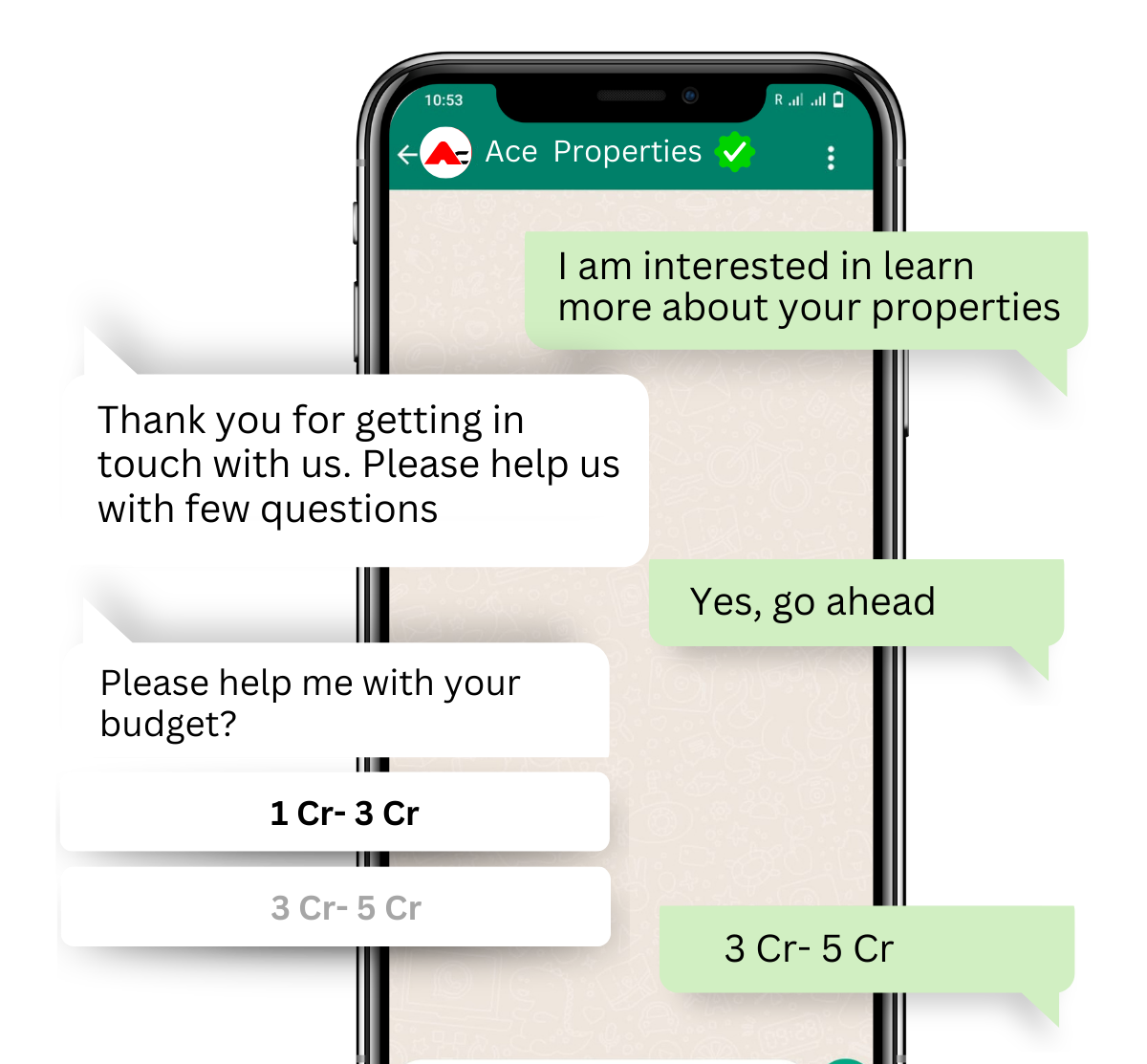
“Hi {{name}}, thanks for your interest in Hello CRM! I’m here to help you explore the right plan — mind if I ask a few quick questions?”


3. Use a Conversational Tone, Not Salesy Language

WhatsApp is informal. Write like a human, not like a corporate brochure.

✅ Do:

  • Ask questions
  • Use first names
  • Keep messages under 3–4 lines
  • Use emojis sparingly to add tone 😊

❌ Don’t:

  • Dump links without context
  • Use jargon-heavy templates
  • Push too hard too early

4. Guide the Lead Through the Funnel with Value

Each message should serve a purpose — to move the lead closer to action.

📊 Examples by Funnel Stage:

StageMessage Type
New LeadWelcome + qualification questions
DiscoveryBenefits or use-case examples
EvaluationFAQs, comparison charts, testimonials
DecisionOffer, urgency CTA, scheduling link
Post-demoRecap + next step or incentive

5. Use Buttons, Quick Replies, and Rich Media

WhatsApp supports:

  • CTA buttons
  • Product carousels
  • PDFs and images
  • Quick reply options

This makes it easy to:

  • Let users navigate flows
  • Download pricing sheets
  • Book calls in 1 tap
  • View product images or use cases

📈 Example:

“Want to schedule a call or view our case study?”
[📞 Book a Call] [📄 View Case Study]


6. Use AI or Chatbots for First Touch, Then Hand Off

Let automation handle:

  • Qualification
  • FAQs
  • Booking links
  • Basic objections
Lead Nurturing

But always offer an option to escalate to a human.

📈 Example:

“Want to speak to someone? I can connect you with a product expert now.”

With Hello CRM, this is built-in: smart routing from AI → human sales rep based on lead behavior or keywords.


7. Avoid Over-Messaging (Use Time Windows)

Don’t ping leads multiple times a day unless they’re highly engaged. Set quiet hours or preferred contact times.

With Hello CRM, you can:

  • Limit messages to business hours
  • Space messages with 1–2 day delays
  • Set frequency caps per week

8. Follow-Up with Context, Not Repetition

If a lead doesn’t reply, don’t repeat the same message. Try different angles:

  • Offer something new
  • Ask an open-ended question
  • Reference their original interest

📈 Instead of:

“Just checking in…”

✅ Try:

“Would it help if I sent you a quick comparison of Hello CRM vs. what you’re using now?”


9. Trigger WhatsApp Based on CRM Activity

With Hello CRM, WhatsApp can trigger based on:

  • No reply to email in 2 days
  • Opened proposal but didn’t sign
  • Trial started but no activity
  • Booking canceled or missed

That’s smart nurturing — based on behavior, not just time.


10. Track Engagement and Adjust Your Flow

Use Hello CRM to monitor:

  • Message open rates
  • Reply rates
  • Clicks on links/buttons
  • Funnel stage changes after WhatsApp messages

Optimize flows by:

  • A/B testing messages
  • Adjusting tone, content, or timing
  • Segmenting by industry or persona

Sample Lead Nurture Flow via WhatsApp (Automated in Hello CRM)

🎯 Goal: Convert Trial Signup → Paying Customer

Day 0:
Welcome message + ask for team size

“Hi {{name}}, welcome to Hello CRM! Are you exploring for solo use or with a team?”

Day 1:
Send quick-start guide + feature highlight

“Here’s how to set up WhatsApp + Voice in 5 mins: [link]”

Day 3:
Check-in + address a common objection

“Need help with setup? No credit card required to get started.”

Day 5:
Offer a call with product expert

“Want a walkthrough? I can book a 15-min session here: [booking link]”

Day 7:
Send testimonial or case study

“See how a team like yours reduced lead follow-up time by 80% with Hello CRM.”

Day 10:
Urgency offer: last day for bonus

“Trial ends tomorrow — upgrade now and get 20% off for 3 months.”


What to Avoid When Nurturing on WhatsApp

❌ Cold Outreach Without Opt-In

Only nurture leads that came to you via consent.

❌ Broadcasting Without Personalization

Generic messages = ignored messages. Use CRM data to personalize.

❌ No Clear CTA

Don’t just inform — ask. Guide them to take a step.

❌ Not Tracking What Works

Without engagement tracking, you’re flying blind. Hello CRM helps you see everything.


Final Thoughts

Lead nurturing is no longer about sending 10 emails and hoping for a click. It’s about building relationships — and WhatsApp is the perfect channel for that.

It’s fast, interactive, and human. And with Hello CRM, you can:

  • Automate nurturing flows
  • Personalize every touch
  • Qualify faster
  • Book more calls
  • Track and optimize your funnel

Want to build WhatsApp nurturing flows that close deals faster?
Start your free trial or book a demo and see how Hello CRM turns conversations into conversions.

Say hello to your new CRM

Take a risk-free trial and explore all capabilities at zero cost for 15 days.
Try Free for 15 Days!

15-day free trial · No credit card required

Say Hello to One Unified Inbox — Conquer Conversations Everywhere | HelloCRM

Read More
Transform WhatsApp into a Multi Agent CRM & Ticketing System

Transform WhatsApp into a Multi Agent WhatsApp Support

Read More

Why Old CRMs Fail Startups (and How HelloCRM Solves It)

Read More

An AI-powered platform that unifies marketing, sales, and support for seamless customer engagement. 🚀

Sales & Marketing

  • Contacts & Companies
  • Deals & Quotes
  • AI Agents
  • Forms & Meetings
  • Tickets & Live Chat
  • Campaigns

Channels

  • SMS
  • RCS
  • WhatsApp
  • Voice
  • Email
  • Live Chat Widget

Tools

  • Phone Number Lookup
  • Email Verifier
  • URL Shortner
  • Lead Scrapper
  • Template Generator

Copyright @ 2026 HelloCRM

  • Privacy Policy
  • Terms of Service
  • Fair Use Policy
  • Privacy Policy
  • Terms of Service
  • Fair Use Policy
Linkedin Whatsapp X-twitter Youtube